

Paying annually costs less for each month and is billed once for the year. Prices are in US dollars, whichever currency your register’s limits are written in. Current prices are on the pricing page.
The trial
Every new workspace starts a 14-day trial. No card is taken. The trial is on the plan you chose on the pricing page, or on Core if you signed up directly. Settings → Plan & billing shows when it ends.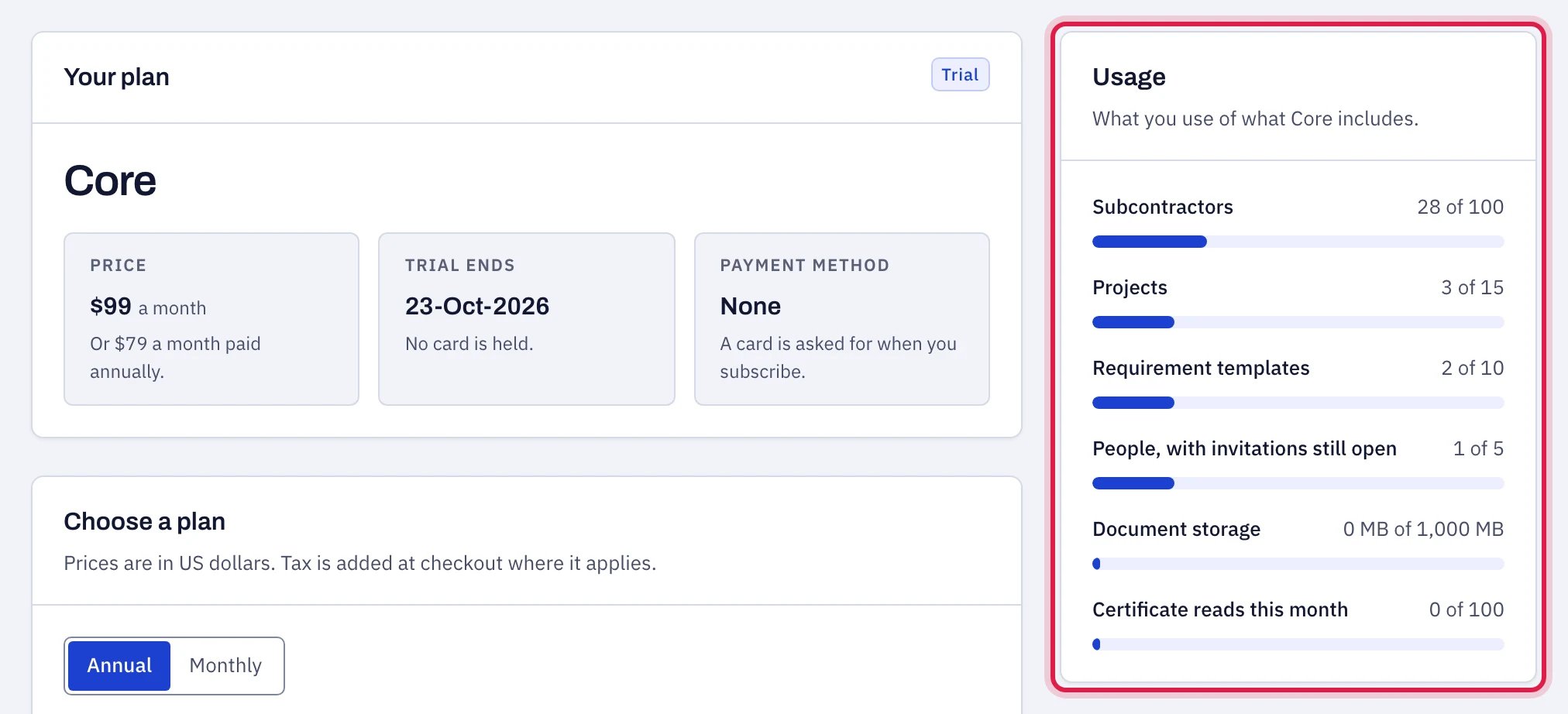
Plan and billing shows your plan, what it costs and when the trial ends, with how much of each limit is in use beside it.
When the trial ends
Nothing is charged and nothing is deleted. The workspace becomes read-only:- You can still open it, read every subcontractor and finding, and export the register.
- You cannot add or change anything: “Your trial has ended. Your register and its export stay available. Subscribe to add or change anything.”
- Chase emails stop. Queued reminders are held until a plan is active.
- revoke share links;
- cancel a queued reminder;
- remove a team member or withdraw an invitation;
- change organization and chasing settings, including switching chasing off, and change the logo;
- mark notifications read.
Paying
Subscribe from Settings → Plan & billing. Under Choose a plan, switch between Annual and Monthly, pick a plan, and press Subscribe. The button says what you will be charged: a month’s price, or a year’s. Payment is taken by Dodo Payments, our reseller, on its own checkout page, which opens in a new tab. Its name appears on your receipt. Prices are in US dollars, and sales tax or VAT is added at checkout where it applies to you. When you come back, the page shows the plan as active and the date it is paid through. It can take a few seconds. Once you are subscribed, the same page is where you manage the subscription. Only an owner or an admin sees these.- Your plan. What you pay and how often, the date of the next payment, and the card on file with Update card to replace it. A new card is entered on Dodo Payments’ page and is used from your next payment.
- Invoices. Each payment, with the number printed on its invoice, Download for the invoice and Email me to have it sent to the address you sign in with. The file is named by that number.
- Change plan. Below the invoices. Press See the plans, choose a plan, and monthly or annual, then Review the change. You are shown what it costs and when before anything happens. A bigger plan starts at once: the days left on your current plan are credited and the new plan is charged. A smaller plan, or the same plan billed the other way, starts at your next billing date, and until then Stay on my current plan drops the change.
- Billing portal. Open the billing portal goes to Dodo Payments’ own page for your account, in a new tab, for receipts and tax details.
Certificate reads
A fillable ACORD 25 is read into the certificate form from its own fields, as often as you like. A flat or scanned certificate, or an endorsement form, is read by a paid service, and each one uses a read. Your plan includes a number of reads each calendar month, shown in the table above. Settings → Plan & billing shows how many you have used, under Usage and under Top up certificate reads. When the month’s reads are used up, Buy 100 reads there adds a pack for $10, paid once. Bought reads do not expire and are used only after the month’s included ones. A certificate a subcontractor sends through an upload link uses one of your reads when it is first looked at. With none left the file still arrives and is kept; only the first look, which tells the subcontractor what appears short, is skipped. You can always enter a certificate by hand. A read that fails, or a file that turns out not to be a certificate or an endorsement form, does not use one of your reads. There is a limit on those, so that the reader cannot be run on such files without end: once as many of them in a calendar month as your plan includes reads (and never fewer than 25) have been sent for reading, automatic reading of flat and scanned files pauses until the next month. The app says so when you ask for a read: “Automatic reading of scanned files is paused until next month, because too many of the files sent this month could not be read. A fillable ACORD 25 is still read, and anything else can be entered by hand.” Buying reads does not lift the pause. Files that subcontractors send through upload links are counted on their own, so they cannot pause your own reading; at worst the first look on upload links stops for the rest of the month.Cancelling
Choose Cancel subscription, under Billing portal on Plan & billing. The subscription runs to the end of the period you have paid for and you are not charged again. Until that date the workspace works as before, the page shows the date it ends, and Keep my subscription takes the cancellation back. There is no notice period. A year paid up front runs to its end and is not refunded in part; choose monthly if you want to be able to stop sooner. Export the register first, or ask us to delete the workspace.If a payment does not go through
The account owner is emailed, and adding or changing anything is paused until the card is replaced with Update card. Nothing is deleted, and the register and its export stay available.Plan limits
- Subcontractors: counts active subcontractors only. Archived subcontractors do not count. At the limit, existing subcontractors keep working (checks, chasing, exports) and you are asked to move up a plan before adding another. An import stops adding new subcontractors at the limit and lists the rows it skipped.
- Projects: counts projects that are not archived.
- Templates: counts every template.
- Users: counts people on the team plus pending invitations that have not expired.
- Document storage: the total size of the files on file, not counting archived documents. When it is full, adding a file says so, and a subcontractor using an upload link is told to send the certificate to you directly. Archive documents you no longer need, or move up a plan.