Short answers to the questions people ask most about tracking certificates of insurance (COIs) in WatchMyCover, each with a link to the full explanation.
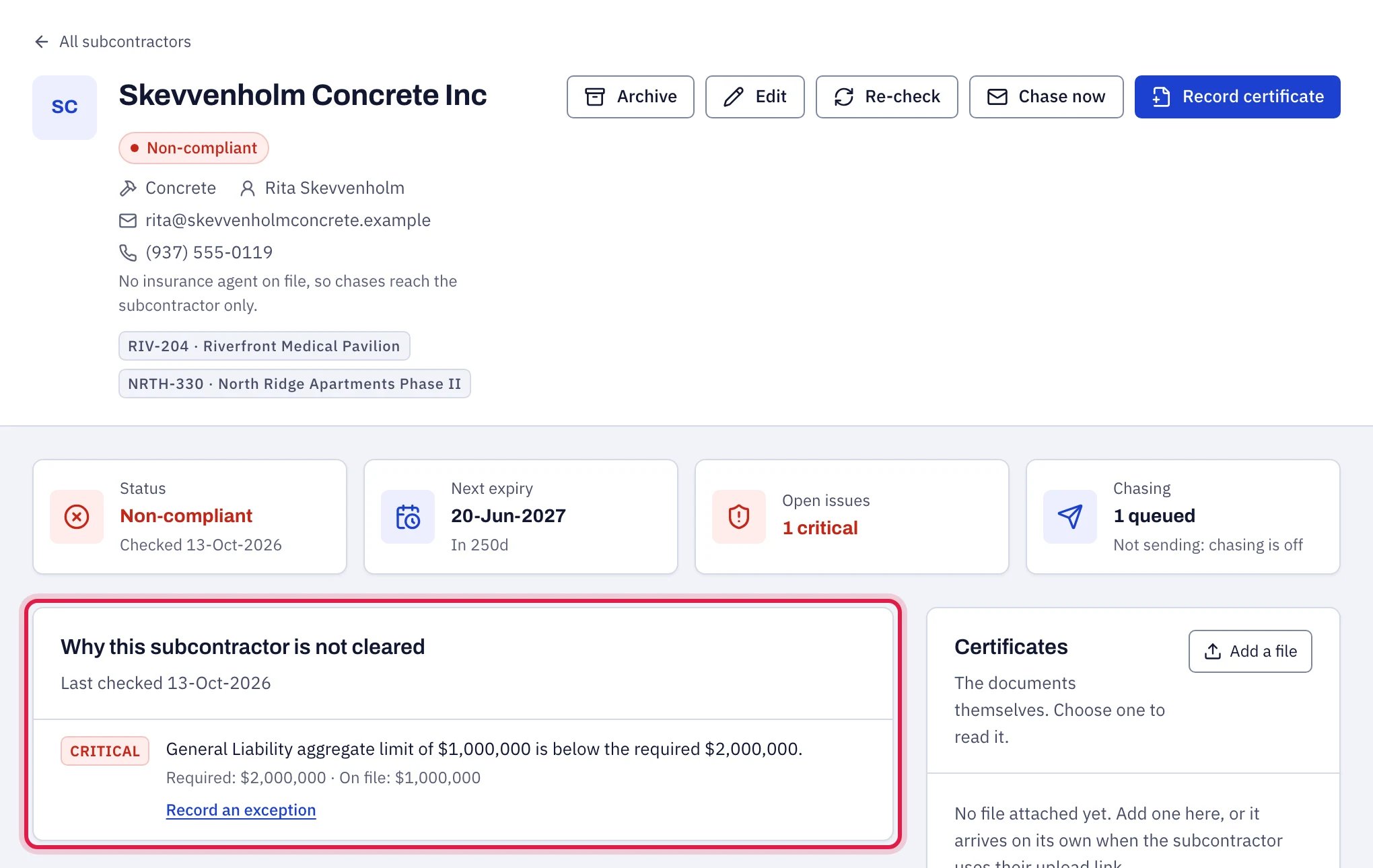
A subcontractor page in WatchMyCover explaining why the subcontractor is not cleared, with the required and on-file figures

Most questions start here: the finding that explains a verdict.

It fills the form in from it, and you check it. Upload the PDF in Record a certificate: a fillable ACORD 25 is read from its fields, and a flat or scanned certificate is read by AI. General liability, auto, umbrella and workers’ compensation are read; other coverages you type in. Anything that cannot be read clearly is left empty and listed. Nothing is saved until you check the values and choose Record and re-check, and the verdict is then worked out by fixed rules. See Reading a certificate PDF.
Because being in date is not the same as meeting your contract. Open the subcontractor: Why this subcontractor is not cleared lists each finding with what was required and what the certificate provided. Common causes are a short aggregate, a missing umbrella, or an endorsement not evidenced. See Every finding explained.
Your template requires endorsements, and a spreadsheet can only record them as stated on the certificate. A certificate cannot amend a policy, so a stated endorsement needs the endorsement form to be confirmed. See Endorsements and evidence levels.
Get the endorsement form named in the finding (or a current certificate, if it is over a year old), upload it under Documents on file, and record the coverage again with Endorsement form on file.
Policies run from 12:01 a.m. to 12:01 a.m., so there is no cover on the expiry date itself. WatchMyCover treats a policy as expired on that day, judged by your organization’s time zone.
No. Chasing is off until an owner or admin switches it on in Settings → Renewal chasing. Until then, reminders are generated and listed under Reminders so you can see what would be sent. See How chasing works.
To the Replies go to address in Settings → Renewal chasing, or the account owner’s address if none is set. Not to WatchMyCover.
No. Every email carries a private upload link that needs no account or password, and they can also reply with the PDF attached. See What subcontractors see.
No. Each coverage is judged on the policy in force today, and a renewal that starts on or before the old policy ends carries the cover forward. Queued chases for the old expiry are withdrawn. See Renewals and several certificates.
Yes. Record each certificate; both stay in force, and each coverage is judged on its own policy.
No, you archive them. Their history is kept, they leave the register, and chasing stops. See Archiving and restoring.
Up to 500 rows per CSV or Excel file, and 4 MB. Split a longer list. Re-importing a corrected file updates subcontractors by name and does not duplicate certificates already on file. See Importing from CSV or Excel.
Not as they are. Dates written in numbers are read month first. A date that can only be day first, such as 25/05/2026, is not imported, and once a column contains one, neither are the dates in it that could be read either way, such as 11/05/2026; those rows are flagged and get no certificate. If no date in the column has a day above 12, the whole column is read month first and the dates will be wrong. Write dates as 31-Dec-2027 or 2027-12-31 before importing. See Dates.
Send a shareable report (read-only, expires after 7, 30 or 90 days or on a date you choose up to a year out, revocable), or the CSV export.
Yes. The free certificate checker reads one certificate and gives a verdict against a starting set of requirements, and the free spreadsheet check does the same for every row of a tracking spreadsheet. Neither needs an account, and neither stores the certificate or the sheet on our side. Before the result is shown, each asks once for your name, work email and company, and those do come to us; after that every free tool and every download on the website opens without the form. Unless the certificate is a PDF with filled-in ACORD 25 fields, the file (a flat PDF, a scan or a photo) is sent to an outside AI model to be read. The spreadsheet check leaves a copy of the sheet in your browser, offered back for a week if you sign up; Check another spreadsheet, under its result, removes it.
No. It stands on its own today. Your subcontractor list comes in from a CSV or Excel file, and the compliance register goes out as a CSV on every plan, so it sits beside whatever you already run.
No. Your broker looks after your own policies, and a subcontractor’s agent sends the certificate their client asks for. Sending a certificate is not checking it: measuring each one against the limits and endorsements your subcontract requires is your side of the contract, and that is what WatchMyCover does, for every subcontractor and again at each renewal. See How it works.
Not per project. Requirements come from the template assigned to each subcontractor. Make a template per contract type and assign accordingly.
The currency of the country you choose in the first set-up step: US dollars for the United States, Canadian dollars (C$) for Canada, pounds for the United Kingdom, and so on. The country and its currency cannot be changed once set-up is finished, and amounts are never converted. Subscription prices are in US dollars whichever currency your register uses. See Settings.
Nothing is charged or deleted. The workspace becomes read-only, the export still works, and chase emails stop until a plan is active. See Plans and billing.
From Settings → Plan & billing: choose a plan, then pay monthly or annually. Payment is taken by Dodo Payments, our reseller, and tax is added at checkout where it applies. See Plans and billing.
No, and it is not ISO 27001 certified either. See Security and privacy for what is and is not in place.
Write to info@watchmycover.com with the subcontractor’s name. Check first that the figures and dates were recorded as the certificate shows them.
Yes. On the sign-in page, type your email and choose Email me a sign-in link. The link in that email signs you in. It works once, for 15 minutes. The page says the same thing whether or not the address has an account, and an account with two-factor sign-in uses its password instead. Where it is offered, Continue with Google signs you in with a Google account that has the same email address.
Choose Help at the top right of any page and type your question. An AI assistant answers from these help pages and links the article. It can also look things up in your own register, such as who expires this month, unless the owner has switched that off. Talk to a person, under the chat, sends the conversation to the team, and a person replies by email. See Help in the app.